D'CASTLE
Why Coupang Won’t Load Outside Korea, and How People Use It Abroad
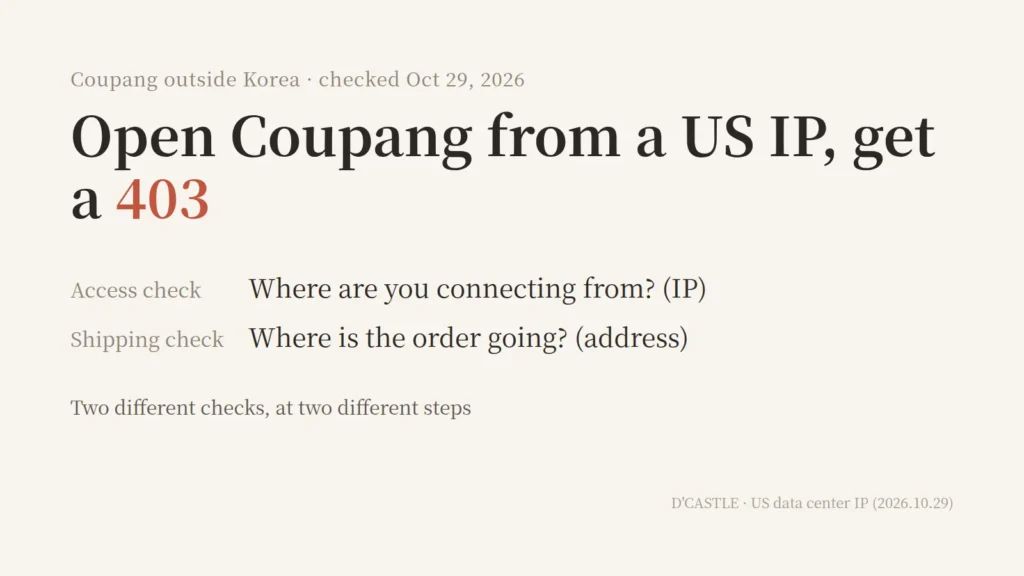
A friend who lives in the US told me they can’t get into Coupang.
My first reaction was “wait, why not?” lol
Kind of fascinating, honestly.
Coupang is a big Korean shopping app, and it turns out it doesn’t even show its front page to foreign IP addresses. Here’s what I pieced together: why, how, how people get around it, and who else does this.
What you see when you open Coupang from the US
Open coupang.com from a US IP and this is what you get.
(For the record, I didn’t open it myself. An AI running in a US data center did.)
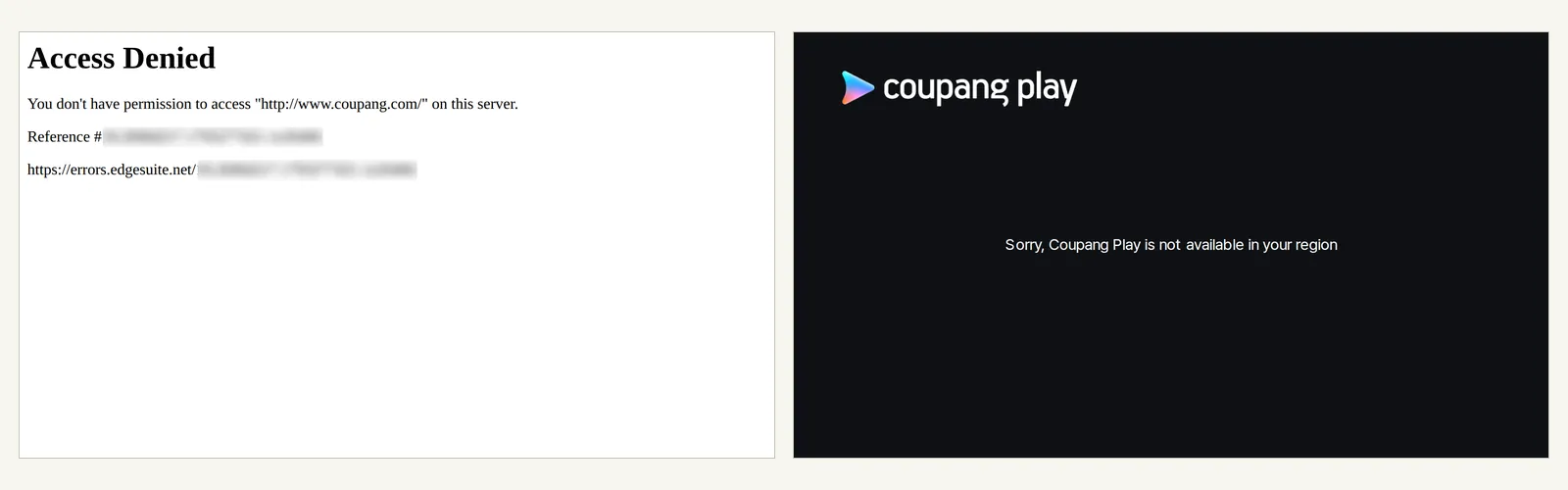
Source: www.coupang.com, www.coupangplay.com/not-available (screens as of October 29, 2026, US data center IP)
On the left is Coupang’s shopping site. No products, no logo. Just “Access Denied” and a 403 error.
On the right is Coupang Play, their streaming service. At least it tells you why.
Sorry, Coupang Play is not available in your region
Not every Coupang service behaved the same way. As of October 29, 2026, from a US data center IP:
- Blocked: Coupang shopping (desktop and mobile web), search pages, Coupang Eats, the Coupang newsroom, and even Coupang’s Taiwan site
- Redirected to a region notice: Coupang Play
- Opened: the Coupang Partners (affiliate) home page, plus the seller center (Wing) and developer center up to the login screen
Looks like each service has its own rules.
Why would Coupang block foreign IPs?
Honestly, I don’t know.
I couldn’t find any notice or FAQ where Coupang explains it. Even its help center and newsroom return a 403 from abroad.
What I could find is why sites in general block foreign traffic. There are roughly four reasons, going by official docs and news coverage.
- Licensing: Netflix’s help center says its library varies by country.
- Regulation: When GDPR kicked in back in May 2018, US papers like the LA Times and Chicago Tribune blocked visitors from the EU. By that August, more than 1,000 US news sites were reportedly still blocked there.
- Security: Korean banks offer a “foreign IP block” you can sign up for. According to Woori Bank, if you’re not on a domestic IP registered with KISA (Korea’s internet agency), you can view your account but can’t transfer money.
- Bot blocking: Coupang’s own developer FAQ says calls get a 403 when the server’s IP is classified as “malicious or high-risk.”
Which one applies to Coupang shopping? No idea.
My guess is that it’s built for customers in Korea, so there’s not much reason to keep the door open for everyone else. It’s also interesting that only Coupang Play, the video service, actually says “your region.”
They ship internationally, so why block?
My first thought when I heard this was:
“Can’t you order from Coupang and have it shipped from Korea to the US or something?”
Turns out there are two separate things going on.
First, which direction does Coupang’s international shipping go? Coupang’s 2025 annual report (the 10-K it files with the US SEC) describes two.
- US products to customers: US sellers send products to Coupang’s US facilities, and Coupang stores, packs, and ships them to customers. The report frames this as helping US brands make international sales.
- Korean products to Taiwan: It sells to customers in Taiwan under the name “Rocket Overseas.” A 2022 Korean news report describes it as letting Taiwanese shoppers get products from Coupang’s Korean Rocket Delivery lineup.
I couldn’t find any Coupang service that ships Korean products to a US home address, not in the report and not in search.
That doesn’t prove it doesn’t exist. It just didn’t show up anywhere official.
Second, access and shipping check different things.
- An access block looks at where you’re connecting from (your IP address).
- Shipping looks at where the order is going (the delivery address).
The access check happens before you can fill out an order, before your request even reaches Coupang’s servers (more on that below). So a company can ship abroad and still block visitors from abroad.
In fact, Coupang’s Taiwan site gave the same 403 from a US IP. Even the site that exists to ship things overseas has picked which countries’ visitors it lets in.
So it’s less “blocking foreign countries.” Actually, no, it’s closer to “only opening for chosen countries.”
How the block works: your IP gives away your country
Here’s my take as a vibe coder with no CS background.
(If I got something wrong, please go easy on me.)
When you go online, your device gets an IP address. Sites look that IP up in a location database to figure out which country you’re in.
The address at the bottom of that 403 page (errors.edgesuite.net) is an error page from Akamai, a CDN company. The response also listed the server as AkamaiGHost.
From what I read, that means Akamai’s front-line servers (the “edge”) turned the request away before it reached Coupang.
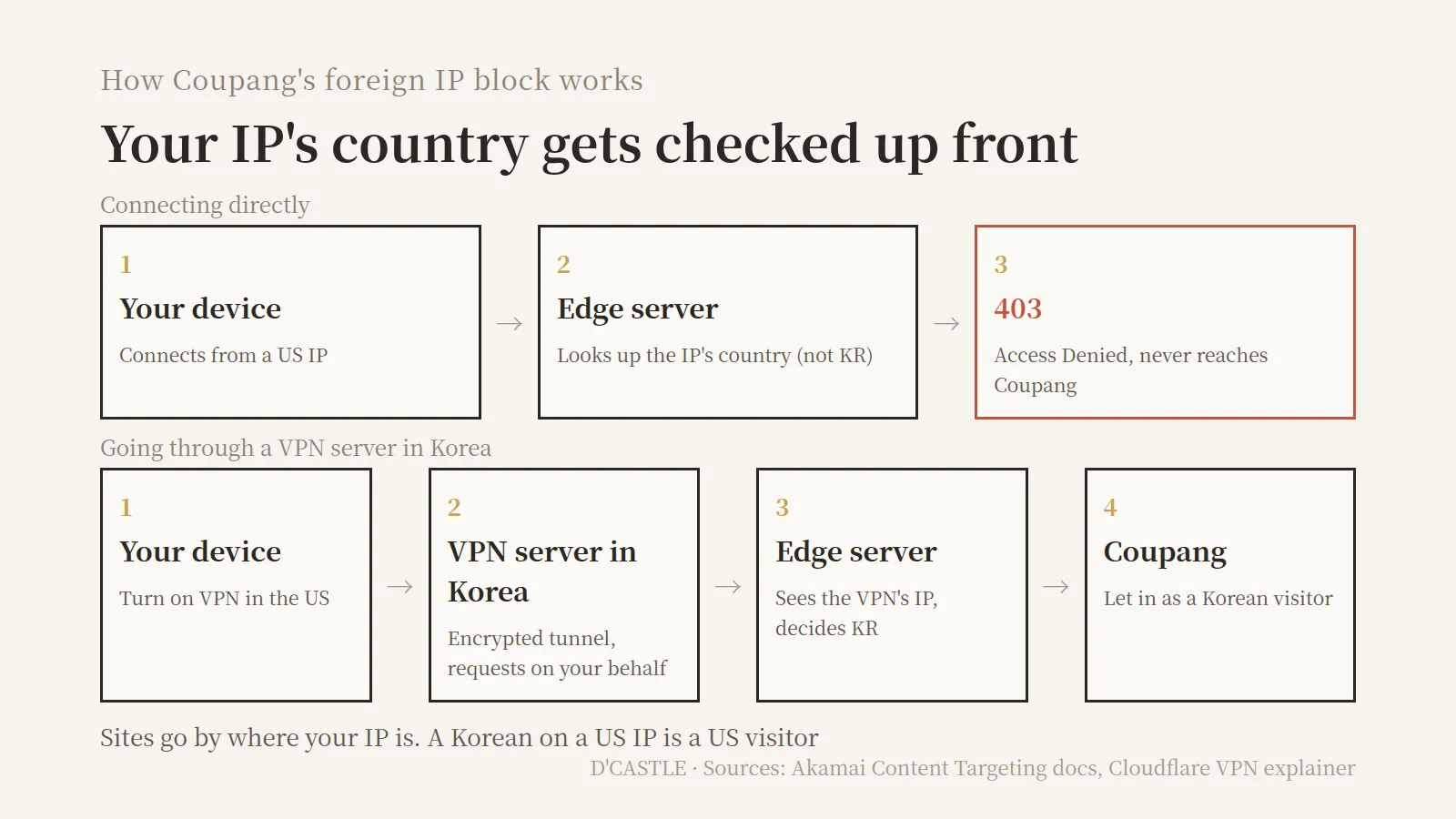
Akamai’s docs describe a feature called Content Targeting. You list two-letter country codes (KR, US, and so on) and allow or deny them. Instead of an error, you can also send denied visitors to a different URL.
I don’t know if Coupang uses that exact feature. But the two outcomes look just like what the docs describe: an error page for shopping, a redirect to a region notice for Coupang Play.
Cloudflare’s docs have a similar example. A rule that blocks everything except chosen countries is one line, like (not ip.src.country in {"US" "MX"}).
Sites go by where your IP is. A Korean on a US IP is a US visitor, and anyone on a Korean IP looks like a Korean visitor.
Why a VPN gets you in
If it were me, I’d probably just use a VPN.
So the fix is simple: connect from a Korean IP. That’s what a VPN does.
Here’s Cloudflare’s explanation, broken into steps.
- Open your VPN app and pick a server in Korea.
- Your traffic gets encrypted and travels through a tunnel to the VPN server. Your internet provider can’t read what’s inside.
- The VPN server makes the request to Coupang for you.
- Coupang only sees the VPN server’s IP. In Cloudflare’s words, web servers only log the IP address of the VPN server.
So you’re physically in the US, but to Coupang you’re a visitor on a Korean IP. Kind of like having someone in Korea open the door for you.
When the VPN still doesn’t work
A VPN isn’t magic, apparently. Country isn’t the only reason sites block you.
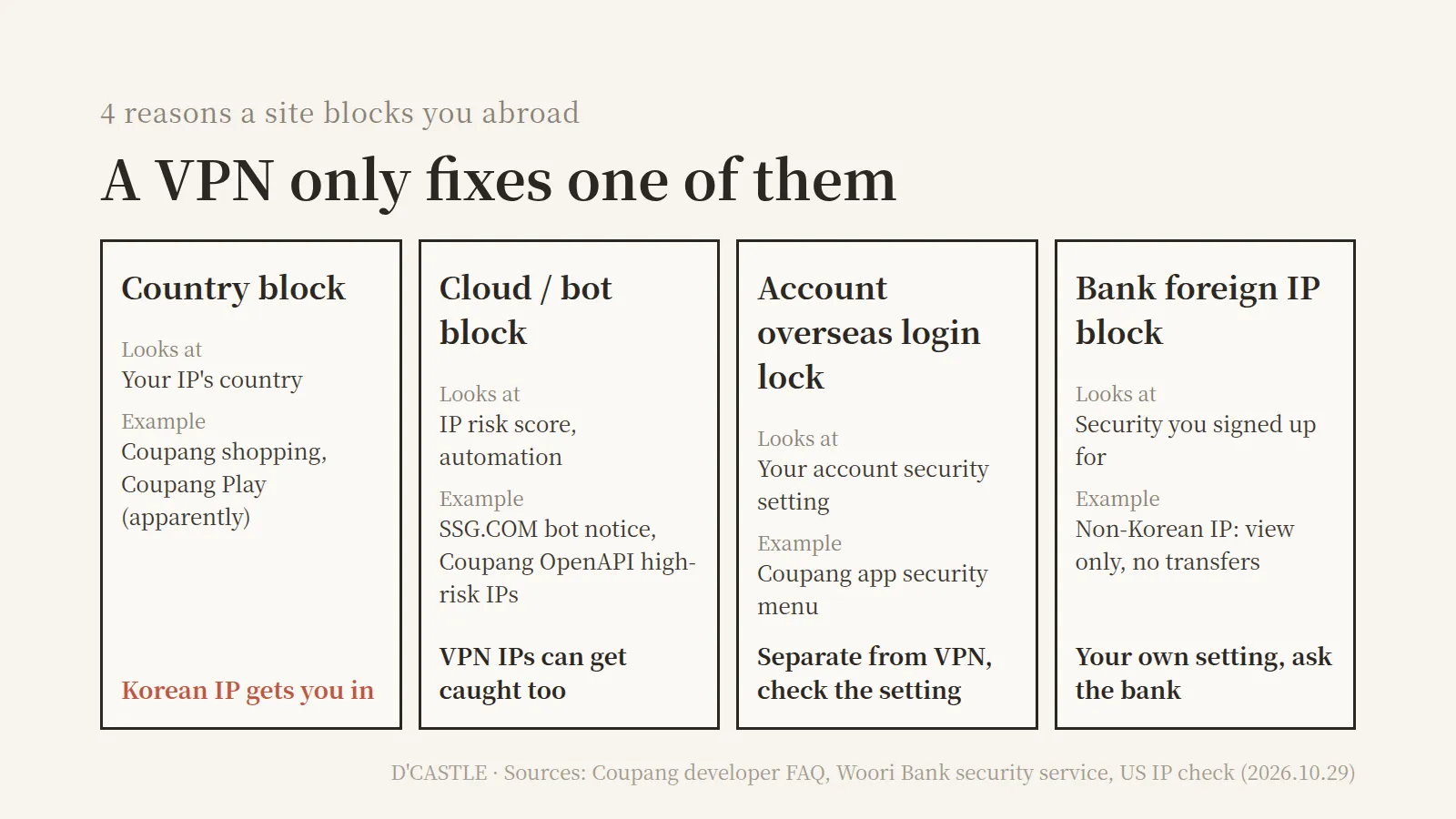
- Country block: A Korean IP gets you through. Coupang shopping and Coupang Play seem to be this type.
- Cloud and bot blocks: A VPN server is still a computer in a data center. If a security system flags that IP as “high-risk,” you can get blocked even on a Korean IP. VPN IPs are shared by lots of people, so they might get flagged more easily. The message SSG.COM (another Korean store) showed the US check, saying an “automated environment (bot)” was detected, is about bots, not countries.
- Account settings: Coupang’s app reportedly has an “overseas login restriction” setting (My Coupang > Settings > Account settings > Security and login). Turn it on and logins from abroad need extra verification. Coupang’s newsroom FAQ also says that after several failed logins from a new environment, you’re locked out until midnight that day.
- Blocks you set up yourself: A bank’s foreign IP block is something the customer signs up for, not a site-wide rule. Different kind of thing from Coupang.
There’s also a useful number for bot-type blocks. Coupang’s developer FAQ says that too many failed requests in a short time trigger a temporary block, and it lifts on its own after you stop for 10 minutes. For blacklisted IPs, it suggests switching to a new one.
It’s written for developers, but the same idea works with a VPN: take a break, then try another Korean server.
That menu path is from an August 2026 walkthrough, so double-check it in your own app.
How to use Coupang from abroad
Traveling, on a work trip, or living abroad
- What you need: a VPN app with servers in Korea.
- Steps: turn on the VPN → pick a Korean server → open the Coupang app or site → if it fails, try another Korean server.
That’s the one I’d use. I’m not picking a specific VPN here.
If your computer back home in Korea is on
Use remote desktop and browse from that computer, and you go out on your home internet’s Korean IP. You have to leave it running, but it’s the same principle as a VPN.
If an AI assistant or automation tool does the browsing
AI assistants that run on cloud computers connect from wherever that computer is. Grok Bot’s official FAQ says some sites block traffic from cloud computers.
In Grok Bot, turning on “Route traffic through this computer” under Settings > Computer sends the bot’s web traffic through the desktop you’re using. According to the docs, sites then see your desktop’s IP address.
The docs list a few conditions:
- Only one of your computers can route at a time.
- Sites that resolve to a private or VPN address are blocked (unless your organization allows them).
- On enterprise accounts, an admin can turn the feature off.
For someone like me with AI tools open in every tab, this might be the most relatable case.
(An AI getting a 403 for a single Coupang search. Heh.)
If you’re a seller
The seller center (Wing) and developer center loaded up to the login screen from a US IP. I couldn’t check what works after logging in.
A few reminders before you go.
(Mostly for myself.)
- Pick a VPN company you trust. All your traffic goes through their servers. Cloudflare’s explainer says a VPN is only as safe as your trust in the provider, and a dishonest one could sell your data. Before installing some random free VPN, look up who runs it.
- Check your login history. Coupang’s “Security and login” menu reportedly shows devices, IPs, and times for each login, and lets you log out devices you don’t recognize (per a December 2025 news report).
- I couldn’t check the terms. I don’t know if Coupang’s terms of service say anything about VPNs. The terms page wouldn’t load from abroad either.
Other sites that block the same way
Is it just Coupang? Here’s how other Korean sites responded under the same conditions, home page only.
| Type | Sites | What a US IP got |
|---|---|---|
| Blocked (Akamai 403) | Coupang, Coupang Eats, Yogiyo, Ohouse | Access Denied |
| Region notice | Coupang Play | not available in your region |
| Bot notice | SSG.COM | Automated environment (bot) detected |
| Opened (shopping) | 11st, Gmarket, Auction, Naver, Musinsa, Kurly, Baemin | Normal home page |
| Opened (government, banks) | Hometax, Gov24, major banks | Normal home page |
October 29, 2026, US data center IP. For banks I only checked the home page; transfers and other transactions are a separate step.
Among Korean stores, Coupang was actually in the minority. The exact same Akamai 403 showed up on Yogiyo (food delivery) and Ohouse (home goods).
One caveat: this check ran from a data center IP, so I can’t tell whether a site blocked it for being foreign or for being a cloud IP. Results from a regular US home connection could differ.
It goes the other way too. In June 2019, Korean news reported Coupang became unreachable from China, blocked on China’s side.
The block cares where you are. Shipping cares where the box goes.
When my friend told me, I figured that if Coupang ships abroad, it should open abroad too.
Turns out they’re checked at two different doors, and one being open doesn’t mean the other is.
If you’re heading out of Korea, it might be worth setting up a VPN with a Korean server and checking Coupang’s “Security and login” menu before you go.
Once you know whether you’re stuck on the IP side or the account side, you’ll waste a lot less time.