D'CASTLE
TrendRadar: An Open-Source Tool That Collects Trending News and Sends an AI Brief to Telegram
There’s a tool that does the “what do I even write about” part for you.
It pulls trending posts from a bunch of platforms plus your RSS feeds into one place, lets AI filter them, writes a summary brief, and pushes it to your phone. For people with side hustles, the slow part usually isn’t writing. It’s finding something to write about. As someone running a blog, I couldn’t scroll past that one.
So I went through the README from the eye level of a vibe coder with no CS background. The English README alone is about 158,000 characters, so if I got something wrong, please be gentle.
TrendRadar at a glance
| Item | Details |
|---|---|
| What it is | Self-hosted tool that collects trending posts and RSS, filters them, and sends AI summaries |
| Maker | sansan0 (introduced as a developer from China; README in Chinese and English) |
| Stars / forks | 63.3k / 24.9k (repo page, Oct 29, 2026) |
| First published | April 28, 2025 |
| Latest version | v6.11.0 (Oct 13, 2026), MCP server v4.1.1 |
| License | GPL-3.0 |
| Default sources | 11 Chinese platforms (Weibo, Zhihu, Baidu, Douyin, Bilibili and others) |
| Alert channels | Telegram, email, Slack, ntfy, Bark, WeChat Work, Feishu, DingTalk, generic webhook (9) |
| AI | 100+ providers through LiteLLM (DeepSeek recommended, OpenAI, Gemini, Anthropic, local Ollama) |
| How to run it | Docker / GitHub Actions / locally with uv |
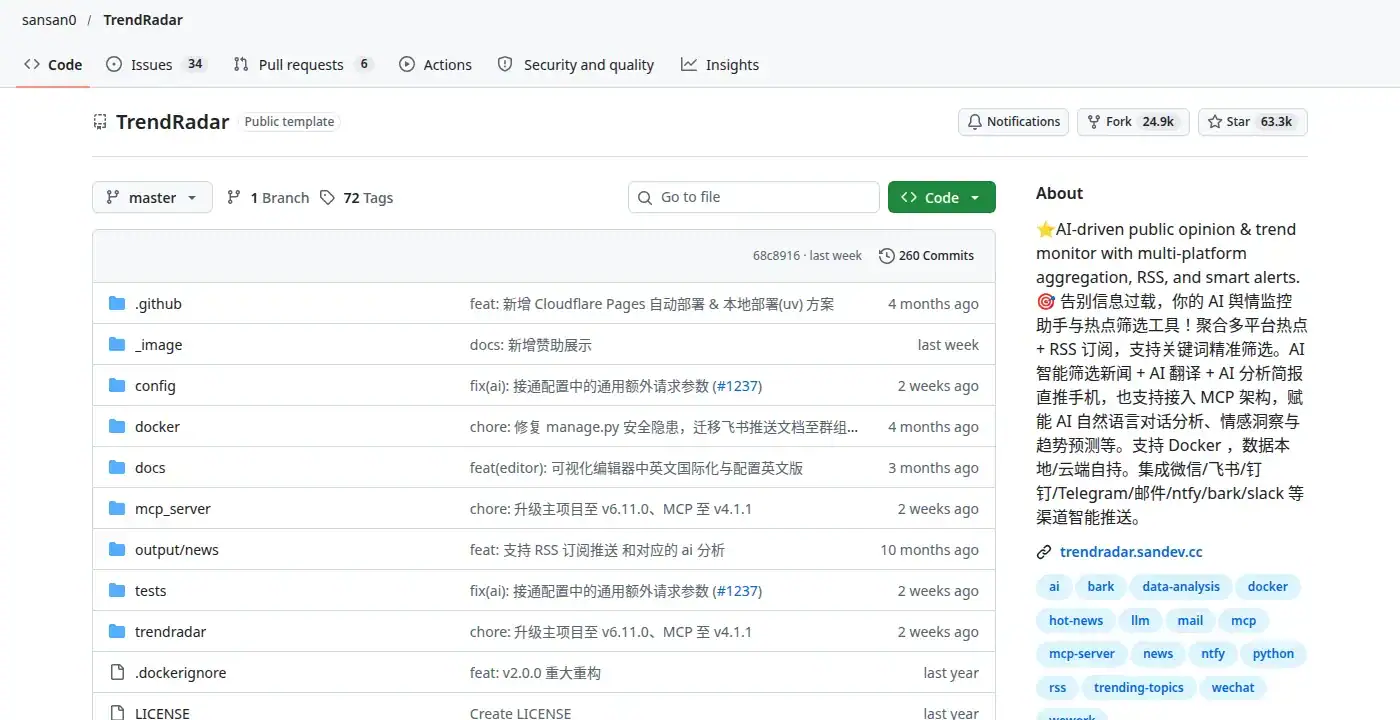
Source: github.com/sansan0/TrendRadar (screenshot taken Oct 29, 2026)
The very first line of the README says “Deploy in 30 seconds.” The idea is to stop the endless scroll and only see news you actually care about. (It will not be 30 seconds for me.)
The MCP part, or asking Claude about the news
The feature the X post called out was MCP support. Per the README, it’s a bridge between the news data TrendRadar has collected and an AI like Claude. Kind of like handing the AI the keys to your news warehouse. After that you just ask in plain words. If it were me, I’d probably start with something like “how did AI news trend this week?”
The README lists 14 tools the AI can call. A few of them: get_trending_topics, analyze_topic_trend, analyze_sentiment, generate_summary_report. For hunting blog topics, the first and the last one sound like enough. Supported clients include Claude Desktop, Cursor, Cline and others.
One catch: the AI doesn’t search the live internet. It only looks at data piled up in the output folder on your own machine. The repo ships with a week of test data (Dec 21 to 27, 2025), so you can try it right away, but for your own interests you need to run the thing and collect at least a day of data. The README also says not to throw several questions at once, and if your model can’t call the tools one after another, switch models. That feels like a note written for me personally. Asking one question with five requirements attached is just human nature lol
Filtering in plain words instead of keywords
One more thing in the README caught my eye: the AI interest filter added in v6.5.0.
The original method is keywords. You list words in frequency_words.txt and only items containing them come through. There are seven syntax types, including must-have words (+), excluded words (!) and regex.
The AI method is a file called ai_interests.txt where you just write what you care about in normal language. The README’s example is roughly “I want AI and renewable energy news.” The AI pulls tags out of that, scores every incoming headline, and only sends the high scorers. You set the bar with min_score on a 1 to 10 scale; the README example uses 6. If AI filtering fails, it falls back to keyword matching so the alerts don’t stop.
Regex reads like a spell book to me, so plain words are a much lower bar. And if YAML files scare you in general, there’s a web form editor too (sansan0.github.io/TrendRadar), with an English interface since v6.11.0.
Under the hood 1: five steps from collecting to sending
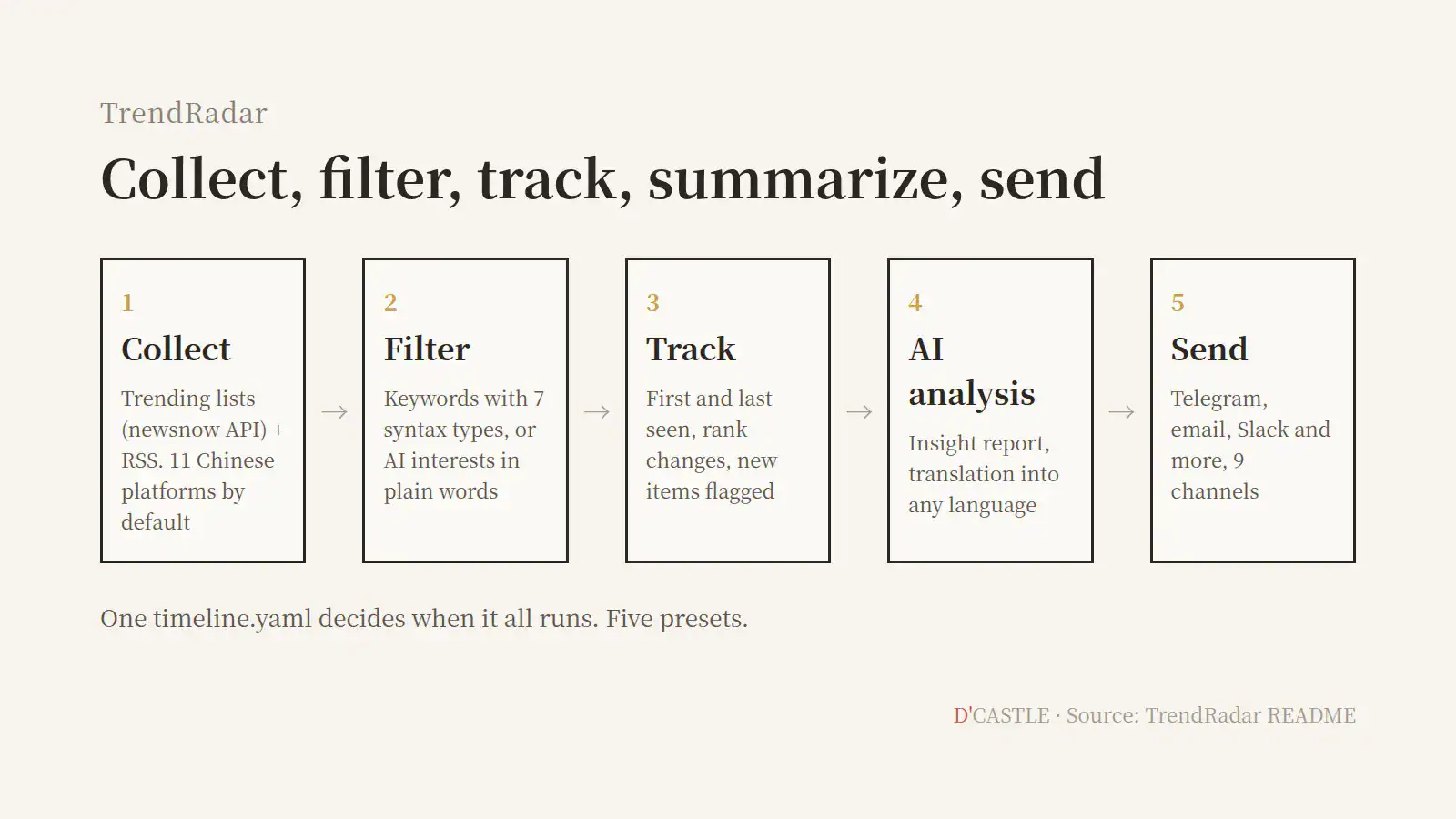
- Collect: Trending lists come from the API of another open-source project called newsnow. By default that’s 11 Chinese platforms, and RSS/Atom feeds plug in alongside. The README suggests sticking to 10 to 15 platforms, since more isn’t better.
- Filter: Keywords or AI interests, as above. RSS goes through the same rules, and a freshness filter drops posts older than a set number of days.
- Track: It records when a story first and last appeared and how its rank moved. New stories get a 🆕 flag.
- AI analysis and translation: The AI reads the filtered news and writes an insight report. Turn on translation and the alert content comes in whatever language you pick.
- Send: Out through 9 channels like Telegram, email and Slack. Trending posts and RSS arrive merged into one alert, and long messages get split to fit each channel’s limits.
One file, timeline.yaml, decides when it collects, sends and runs the AI. There are five presets, it can go day by day, and you can even filter with keywords in the morning and AI interests in the evening.
Under the hood 2: what the alerts look like
There are three push modes, and the README even says who each one is for.
- daily: Everything matched that day, including items already sent. For managers and regular users.
- current: Whatever is on the rankings right now. Stories that stay on the list show up every time. For content creators.
- incremental: Only new items, zero duplicates. For traders and investors.
A blogger digging for topics landing in the “content creators” box is a little funny, but fair.
With AI analysis on, a report gets attached to the end of each alert: a summary of hot topics, which way opinion is leaning, links across platforms, and possible impact. You can also change the analyst’s voice in ai_analysis_prompt.txt. The README’s examples are a “Sarcastic Commentator” and a “Senior Investment Advisor.” So it’s a news summary in a character costume.
There’s also an HTML report for the browser, and since v6.7.0 it exports to Markdown, which the README specifically says is good for feeding into an LLM. If you live with a pile of AI tabs open, that’s basically one paste into your Claude tab.
Under the hood 3: the maker’s numbers and the warnings already in the README
Numbers first. 63.3k stars, 24.9k forks, 260 commits, 72 tags, 34 open issues (repo page, Oct 29, 2026). The Docker image wantcat/trendradar has been pulled 359,553 times according to Docker Hub. With 260 commits and 72 tags, that works out to very roughly one release every three or four commits.
The README is pretty upfront about the gotchas. Here are the ones I think people like me should know before installing.
- If you run it on GitHub Actions, you have to click a check-in every 7 days or it stops. Default schedule is every hour on the hour. The maker’s reasoning is kind of great: if you forgot about it for 7 days, maybe you didn’t need it, so call it a digital detox. It’s also about not wasting GitHub’s shared compute.
- On Actions without cloud storage (like Cloudflare R2), it runs in a lite mode. Collecting, filtering and alerts work, but new-item detection, trend tracking, incremental mode and MCP analysis don’t. R2’s free tier covers 10GB a month; it asks for a payment method, but the README says that’s for identity verification only and there’s no charge.
- Data is kept forever by default. If you’ll run it for a long time, retention_days lets you set something like 30 days.
- Some international news topics may get a translation refusal from the AI model. The README warns about this up front.
- Use “Use this template” instead of Fork. Forking can cause runtime problems (issue #606).
Two reminders I’m adding, mostly for myself. First, there are other things called TrendRadar, like one on Product Hunt, that have nothing to do with this project. Make sure the address is github.com/sansan0/TrendRadar before you grab anything. Second, it’s GPL-3.0. If you modify it and distribute it, your version has to be released under the same license, so read up before building something to sell on top of it.
Under the hood 4: if someone like me wanted to try it
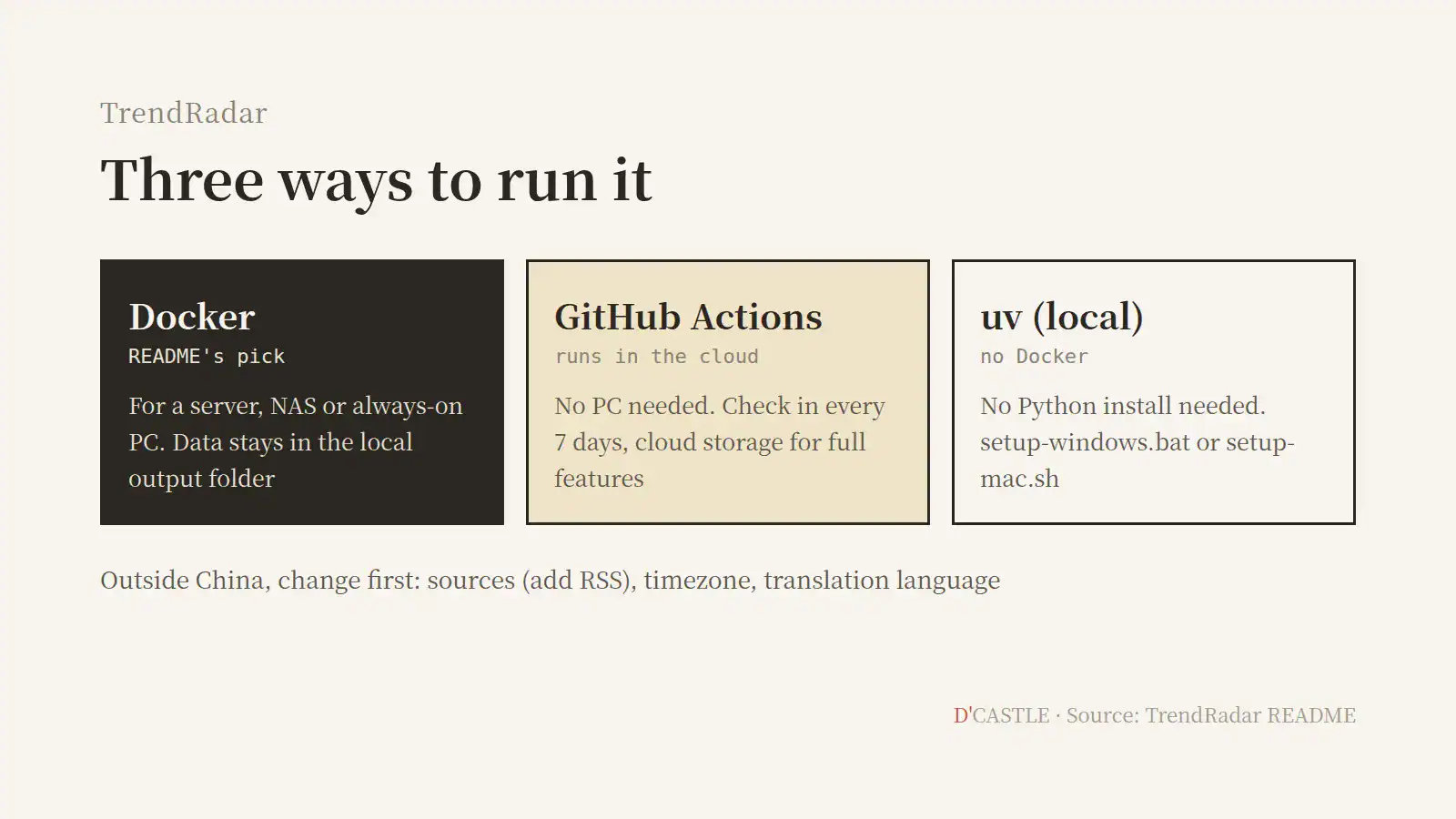
The README recommends Docker. No always-on machine? GitHub Actions. Docker feels like too much? The uv route runs it directly, no Python install needed (Windows users can double-click setup-windows.bat, Mac users run setup-mac.sh).
With Docker, you clone the repo, step into the docker folder, then pull and start just the main service. Edit the config files before you start it.
git clone https://github.com/sansan0/TrendRadar.git
cd TrendRadar/docker
docker compose pull trendradar
docker compose up -d trendradar
The MCP image (trendradar-mcp) is separate and optional, and the README says most people only need the main one. The files you’ll touch are config.yaml, frequency_words.txt and timeline.yaml in the config folder, plus docker/.env for secrets like API keys. The .env file is kept out of git, which I appreciate. Someone like me could easily paste a key into a config file and push it straight to GitHub.
For Telegram, you make a bot.
- Find @BotFather in Telegram. The README specifically says to look for the blue verification check, because fakes exist.
- Send /newbot, pick a name that ends in “bot,” and you get a token. Put it in TELEGRAM_BOT_TOKEN.
- Message your bot once, find your chat_id (for example via @userinfobot), and put it in TELEGRAM_CHAT_ID.
AI analysis needs three settings: AI_ANALYSIS_ENABLED=true, AI_API_KEY and AI_MODEL. The README recommends DeepSeek (deepseek/deepseek-chat) for its cost-performance when you run it often.
If you’re not in China, there are three things to change first.
- Sources: All 11 defaults are Chinese platforms. newsnow’s source list also has non-Chinese options such as github, hackernews, producthunt and steam, so you can swap those in, and RSS covers everything else. Skip this step and your Telegram fills up with Weibo trends 🤔
- Timezone: The default is Asia/Shanghai. Set app.timezone in config.yaml to your own (the README gives America/Los_Angeles and Europe/London as examples) or the alerts show up at odd hours. On GitHub Actions, the cron schedule runs on UTC on top of that.
- Translation: Set ai_translation.enabled to true and language to your language, written like the README’s “English” example.
The X post’s advice was “pick just three keywords and start with Telegram alerts.” Keywords go in frequency_words.txt, with blank lines separating groups; leave it empty and you get everything. So: sources, timezone, three keywords, a Telegram bot. Do those four and something should land on your phone in the morning. The post also warned that Docker first-timers will probably get stuck once during setup, which is worth remembering, and the uv route is there if Docker isn’t your thing. (And if I get stuck, I’ll just ask an AI. heh)
The time spent finding what to write
The X post named who this fits: side hustlers hunting blog and Shorts topics, people who report industry trends at work every day, and online sellers chasing rising keywords. Mapped onto the README’s modes, I’d guess topic hunters want current, daily reporters want daily, and keyword chasers want incremental, which only sends what’s new.
It also takes some work in a few cases. Without an always-on machine you have to remember the 7-day check-in, and if you want news from your own country, you’ll be clearing out the default sources and adding RSS first. Once that’s done, someone else’s radar becomes yours.
The topic-hunting chore goes away. No, it doesn’t go away so much as move into one alert in the morning. Picking is still my job.
Start small, like the post said. Three keywords, one Telegram bot.