D'CASTLE
BLA, an Open-Source Shield Against AI Reverse Engineering: What It Can and Can’t Protect for Solo App Devs
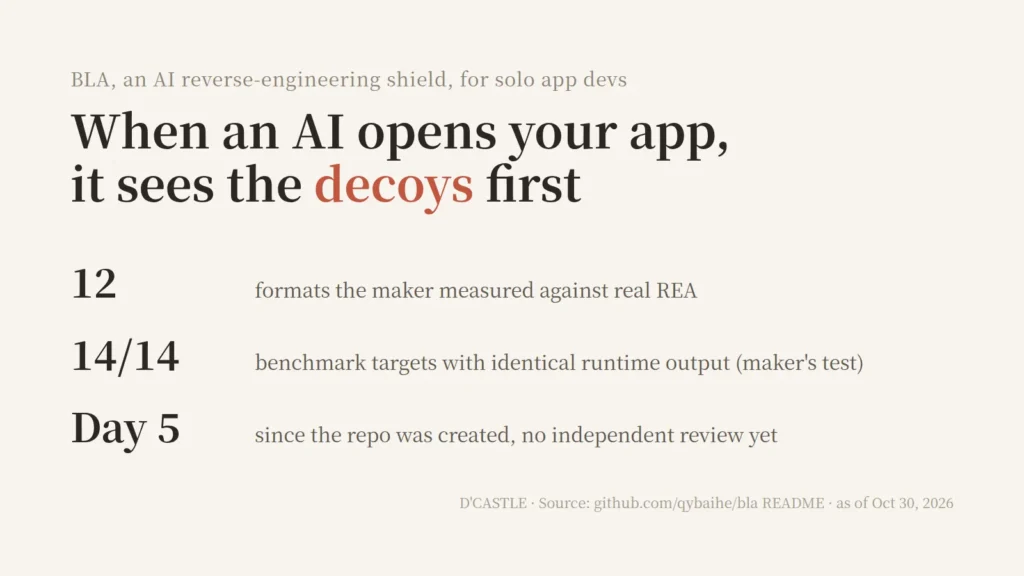
There are now tools where you hand an AI agent your app’s files and it takes them apart, no source code needed, and helps build something similar.
On the other side, a tool for the defender showed up. It’s called BLA (Blind LLM Agents). The idea is that it plants decoys in the build you ship so an AI analyzer spins its wheels.
I ship my apps as plain builds. No obfuscation, nothing. So before “what does it do,” I had a different question.
Can I actually trust this thing?
The AI that takes apps apart: REA
The tool BLA is aimed at is an open-source project called REA (Reverse Engineer Anything).
According to its README, an AI agent investigates an app without its source, explains how a feature works, and recreates something similar for your own project. It covers native programs, JavaScript and Electron apps, .NET, and websites.
It has 407,423 GitHub stars as of October 30, 2026. The repo is only about six months old.
I’m not going to explain how to use it here. This post is only about the defending side.
What I’d actually miss is the idea, not the code
So, if someone took my app apart, what would hurt the most?
Honestly, not much. The idea, I guess. Oh, and the core logic. That’s probably the one thing.
But here’s the thing: AI wrote that code. If I had thought it all through and hard-coded every line myself, I’d probably be precious about every single piece of it. Since AI wrote it, it just feels different.
Still, I’d rather not get ripped off, lol.
If someone ran something like REA on my app and shipped a copy in a day, yeah, that would annoy me. There’d be some swearing.
(None of it fit for a blog.)
Flip it around, and I have looked at other people’s apps and thought about digging in to see how they did it. I’ve never actually done it, though.
If what I care about is the idea and the core logic, it makes sense to size my expectations of a defense tool around that.
How BLA works, per its README
The BLA README splits what it does into three layers.
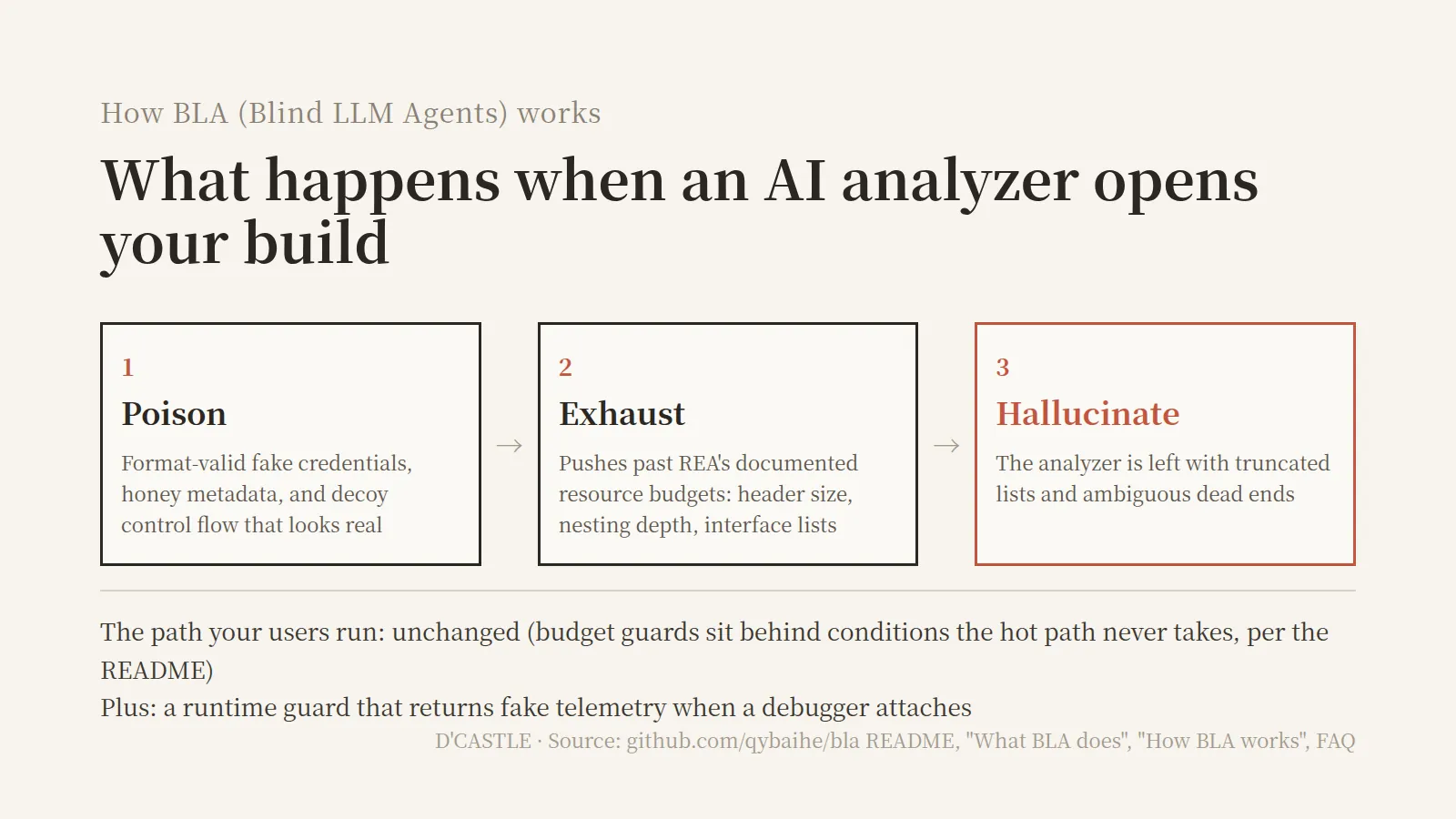
- Poison: Plant format-valid fake credentials, honey metadata, and decoy control flow that looks like real evidence.
- Exhaust: Deliberately push past the resource budgets documented in REA. Things like header size, nesting depth, and interface list length.
- Hallucinate: Leave the analyzer holding truncated lists and ambiguous dead ends.
Another section of the README adds one more piece: a runtime guard. It hardens Electron app settings and returns fake telemetry when a debugger attaches.
The 1.5.0 changelog also says it spread warning-style bait text across every format, meant to make AI models refuse to analyze the file.
My mental picture: a convincing fake treasure map at every entrance to a maze, and a backpack that fills up before you can unfold even one.
(I’d fall for the first map, for the record.)
And the people who actually use my app? According to the README FAQ, the output on the path your app really runs doesn’t change. The budget-busting parts sit behind conditions the normal path never takes.
What the maker measured, estimated, and didn’t test
What stood out most in the README is that it sorts its numbers into three kinds.
Measured: The maker ran real REA and the analyzer actually threw a budget error. Here are three formats common in web and desktop apps.
| Format | Size before → after | REA result |
|---|---|---|
| JavaScript | 761 B → 116 KiB | Rejected for exceeding analysis budget |
| Electron ASAR | 607 B → 16.9 MiB | Capacity error (16 MiB header limit) |
| WASM | 54 B → 6.56 MiB | Interface only partially read |
From the README section “Empirical results vs real REA,” recorded on Node v24.22.1. These are tiny test files, so don’t read this as “your app will grow by X times.”
Add Go, Erlang, SQLite, and AI model files (Safetensors, GGUF) and the measured table comes to 12 entries.
Designed only: The shield exists, but it hasn’t been measured against REA yet. Python, Android DEX, Unity IL2CPP, .NET, JVM, and others live here.
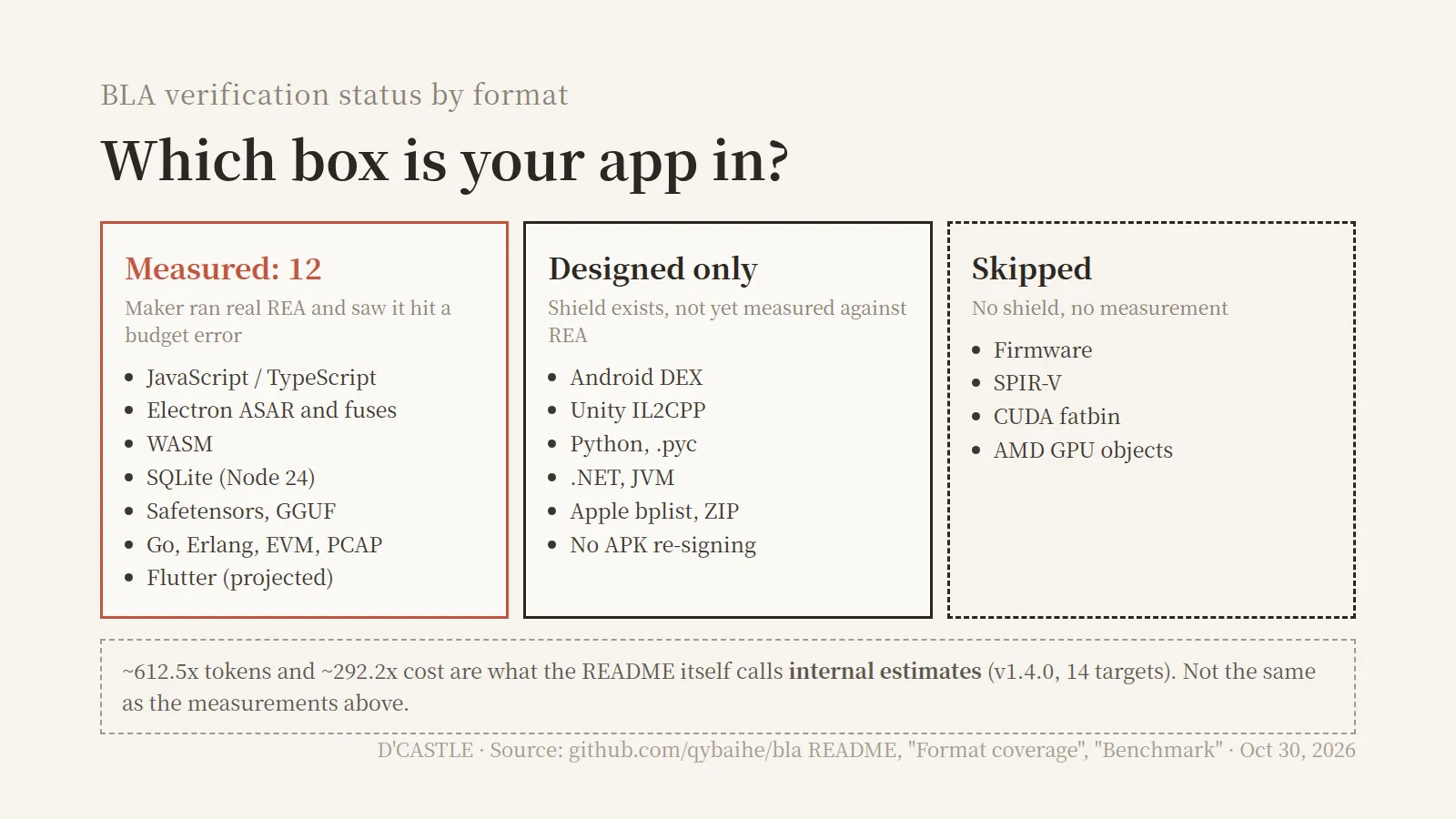
Estimated: The 14-target benchmark gives roughly 612.5x tokens and 292.2x cost. The README itself says these are internal estimates calculated from its catalog of REA limits, and not the same thing as the measurements above.
One thing from that same benchmark is measured: all 14 targets gave 100% identical input and output after protection (14/14). That’s as of v1.4.0.
So from a solo dev’s point of view:
- Web apps and Electron desktop apps (JS): measured by the maker against real REA
- Android apps and Unity games: shielded, not measured yet
- Anything like “600x the AI cost”: an estimate
What it can’t protect
BLA’s disclaimer spells out its own limit.
no client-side protection scheme can guarantee absolute mathematical secrecy
In plain terms: against a human analyst with time and a debugger, no client-side protection can promise to keep a secret. The very next sentence says keep high-value secrets like private API keys and signing keys on a trusted server.
The README also lists, in its own table, what it didn’t test.
- Native decompilation (Ghidra): not run in their setup
- Live debuggers (Frida, LLDB, and so on): not run
- The full Android APK pipeline: APK re-signing isn’t supported
- Firmware, GPU objects: skipped
There’s a public challenge, too. It invites people to crack a BLA-hardened file with an AI reverse-engineering agent. The maker openly notes that an earlier version (v4.1) was broken by a red team running 15 CPU cores for 12 minutes, plus a person hand-building a solver. The current one is v5.1, with that cause fixed.
From where I sit, as a vibe coder with no CS background, BLA looks like a tool that raises the cost for an AI analyzer to take your build apart. More a speed bump than a lock.
(If I got something wrong, go easy on me.)
This part is a lecture to myself. If there’s a secret like an API key baked into your app, moving it to a server comes before adding BLA.
Can I trust it?
This is the part I wanted to know most. Here’s what I can line up as of October 30, 2026.
How old it is
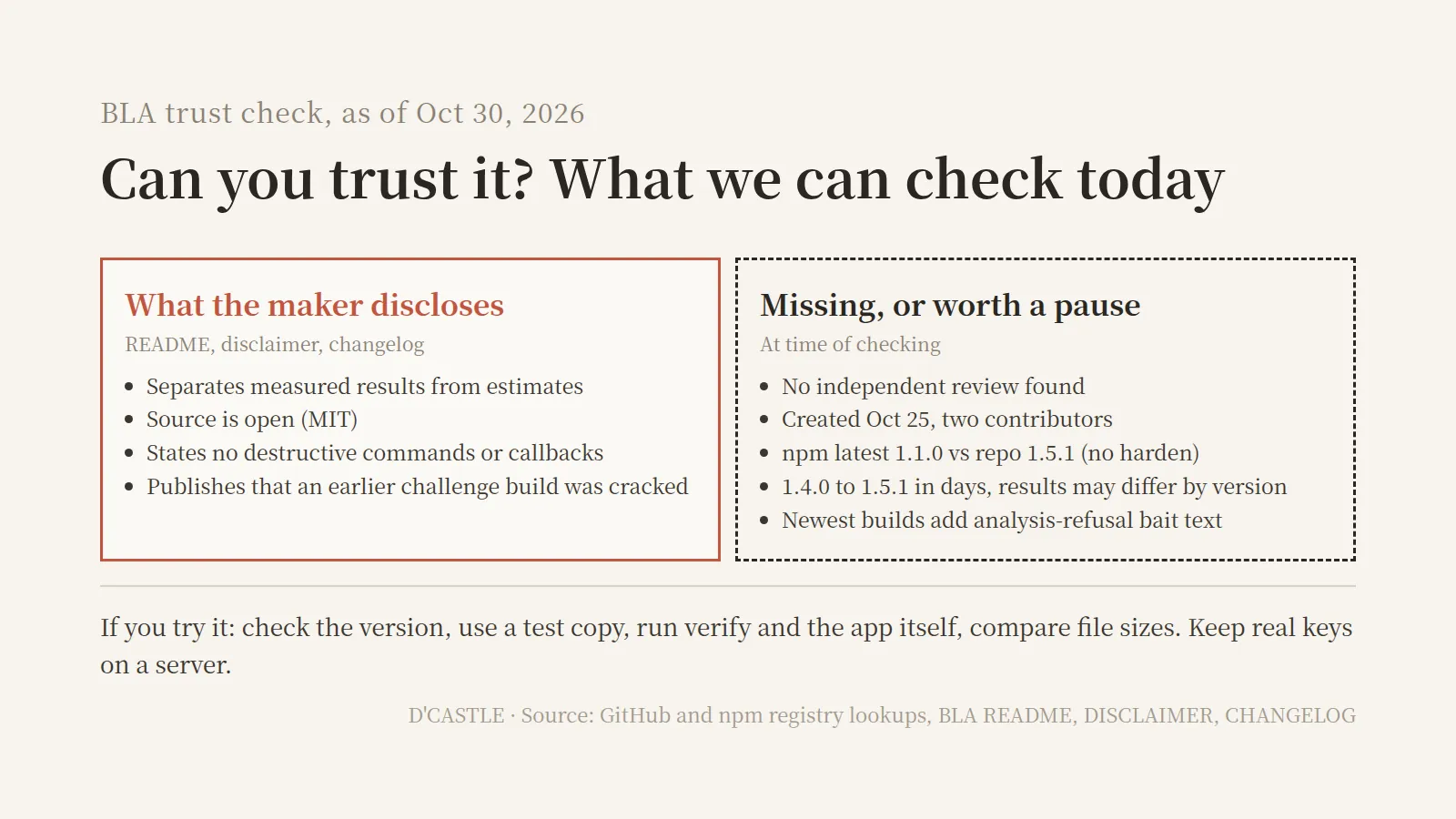
The repo was created on October 25, 2026. That’s day five as I write this. Two contributors, about 670 stars, MIT license.
I couldn’t find anyone other than the maker verifying its effects. Every measurement and every estimate above comes from the maker.
Versions that change almost daily
Between October 27 and 30, it went from 1.4.0 to 1.5.1.
The 1.5.1 changelog adds a response to a new REA analyzer, and also fixes a bug where single-file executables built with Bun got broken during protection. That says they fix things fast. It also says your build could break depending on the version.
The npm version trap
Here’s the catch. 🤔
The latest version on npm is 1.1.0 (published October 25), while the GitHub releases go up to 1.5.1.
If you copy npx bla-agents harden . straight from the top of the README, npm gives you 1.1.0, and 1.1.0 has no harden command, so it may fail right there. In 1.1.0, defend does that job.
Install it with npx today and you get an older version than the one the README describes. The analysis-refusal bait text mentioned above isn’t in the 1.1.0 build either.
What ends up in my build
Flip side: if you use the latest repo version, that bait text goes into your shipped build.
I found nothing on whether that affects app store review or antivirus verdicts. I’m just noting it so you know it’s there.
Some good signs, too
- It separates measured results from estimates on its own. It even warns that a check command called
verify:reamust not be cited as evidence of protection. - The source is open under MIT. You can at least see what goes in.
- The disclaimer states it never injects destructive commands, shell payloads, or network callbacks.
- It didn’t hide being cracked. That’s the v4.1 story above.
One more thing. The REA README warns that a similar repo name or a copied README is not proof of an official release. This corner of GitHub seems to have a lot of lookalike repos. Before installing, match the repo (qybaihe/bla) and the npm name (bla-agents).
So here’s where I land. It’s trustworthy. Well, no, not “trustworthy” exactly. What I can confirm is that it’s a tool that’s honest about what it has and hasn’t proven.
It’s not a tool someone else has vetted yet. Then again, asking that of a five-day-old project is a bit early, heh.
If you still want to try it
I haven’t run it yet. I’m open to trying it on a test build later.
For when that happens, here’s the order I put together from the official docs and the npm 1.1.0 help text.
What you need
- Node.js: 22.13 or newer, or 24 and up (per package.json). For reproducing the maker’s red-team runs, they recommend 22.23.4+ or 24.
- A test copy: Not your release folder. The disclaimer also says to verify in staging before shipping.
- An AI coding tool (optional): Hook it up to Claude Code, Cursor, Codex, and others, and you can just ask it to harden your software. The CLI alone works too.
Steps
- Check the version first. Run
npx bla-agents -vto see what you’re actually getting. If it’s 1.1.0, there’s no harden. - Preview setup.
npx bla-agents setupregisters an MCP server and a skill in your AI coding tool’s config. The 1.1.0 help lists--dry-run, so you can see what it’ll change first. - Apply protection. On npm 1.1.0 it’s
defend <path>; on the latest repo version it’sharden .. Either runs audit through verify in one go. - Pick a strength. There are four: stealth, balanced, maximum, bankrupt.
protectdefaults to balanced, whiledefendandhardendefault to the strongest, bankrupt, so the same tool can give different results depending on the command. - Verify. Compare with
verify <protected> <original>, then actually run the app and check every feature. - Compare sizes. As the measured examples show, files can grow. If download size matters for your app, look at this.
- To back out,
uninstallremoves the MCP config and skill files.
The install docs also show running protect on every build via postbuild. Automate it only after running it by hand a few times and confirming the app still works.
There are tools that raise the cost of taking my app apart, but deciding whether to trust the tool is still on me.
For someone like me, where what I’d miss is the idea more than the code, BLA seems sized about right for the feeling of “still, I’d rather not get ripped off.”
As for whether I can trust it, the only answers right now come from the maker’s own records.
If you’re shipping plain builds like me, check whether there’s a key baked into your app before anything else, then check which version you’re installing.
You can add a shield later, but a key that already shipped inside your app has already left your hands.