D'CASTLE
Ransomware as a Service, Explained: What to Do If You’re Hit and How Not to Be
Ransomware has a head office and franchisees now.
One group builds the ransomware, a different group actually breaks into your network, and they split the ransom. It’s called Ransomware as a Service, or RaaS.
I went through how it works, what the latest numbers say, and where it actually shut things down. Then I spent most of my time on the two things I really wanted to know: what to do, in order, if it hits you, and what to set up so it doesn’t.
How the ransomware franchise works
Ransomware is malware that locks your files and demands money to give them back.
According to a Microsoft Security blog post from May 2022, the work is split into separate roles. Microsoft calls it a “gig economy.” To me, franchise just clicked better.
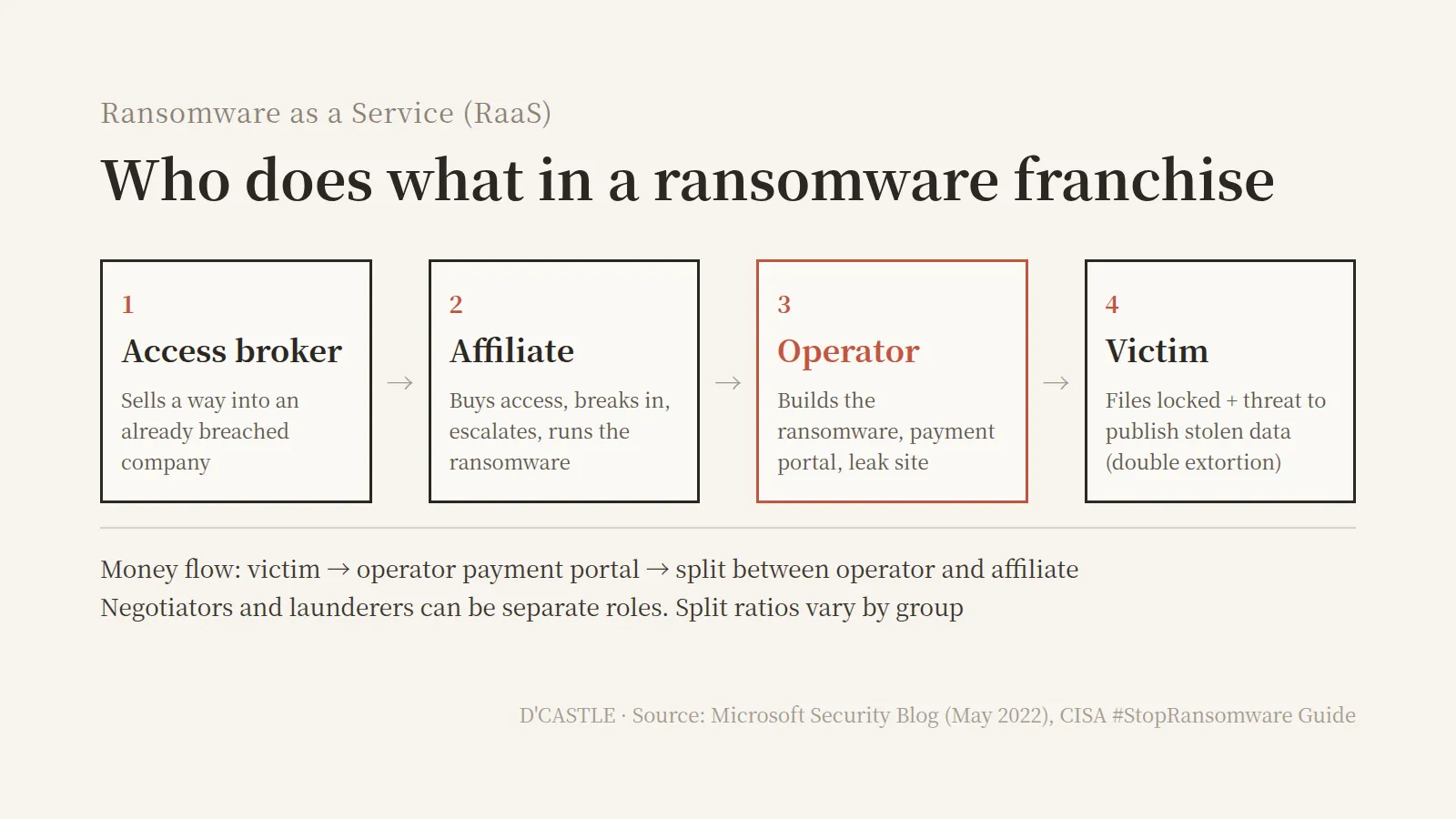
- Head office (operator): builds and maintains the ransomware and the payment portal. Many also run the leak site where stolen data gets posted, and help with negotiations.
- Franchisee (affiliate): actually gets into the company network, raises its access, and runs the ransomware. Splits the ransom with the operator.
- Supplier (access broker): sells access to companies that are already breached. The affiliate buys it and walks in.
- Everyone else: negotiators and money launderers can be separate roles, reportedly.
The split varies by group. LockBit, the famous one, reportedly had the operator keep 20% of each ransom, with the rest going to the affiliate.
The threat comes in two layers, too. CISA, the US cybersecurity agency, calls it double extortion: lock the files, then threaten to publish what was stolen.
So in vibe-coder-with-no-CS-background terms: it’s a setup where you don’t need the skills, you can just buy the way in.
(If I got something wrong, go easy on me.)
The numbers: more attacks, fewer payers
Blockchain analytics firm Chainalysis published its 2025 numbers in February 2026, and the trend is a little strange.
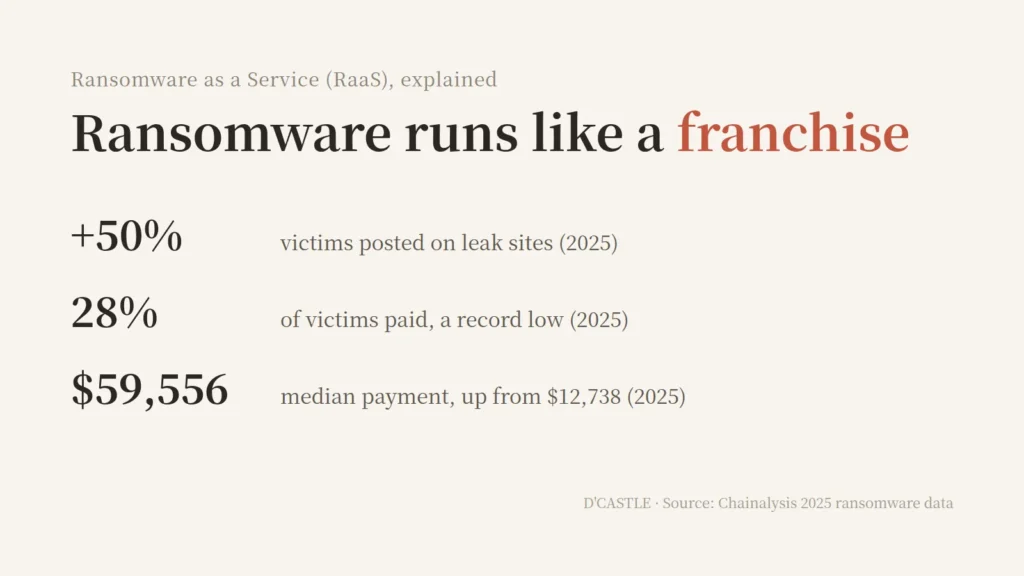
- Victims posted on leak sites: up about 50% from the year before.
- Share of victims who paid: 28%, a record low.
- Total ransom paid: about $820 million, down roughly 8%. Second year of decline.
- Median payment: from $12,738 to $59,556, about 4.7 times higher.
So attacks went up. Well, more precisely, the number of victims named on leak sites went up. Fewer people paid, and the ones who did paid a lot more.
I guess when most people stop paying, you go after bigger targets.
(Apparently crime has an average order value too.)
Access brokers took in at least $14 million on-chain in 2025. When those payments rise, ransomware payments and leak posts tend to rise about 30 days later, according to Chainalysis. The door gets sold, and a month later it gets opened.
Korea, where I live, is heading the same way. Ransomware reports to KISA, Korea’s internet security agency, hit 274 in 2025, up 40.5%. The first half of 2026 alone had 145, up 76.8% from 82 a year earlier.
Hospitals, factories, a bookstore
It sounds like a company problem. What actually stops is everyday life.
- Hospitals: In June 2024, London pathology provider Synnovis was hit, and blood matching and surgeries at London hospitals were disrupted. NHS London said more than 800 planned operations had to be pushed back in the first week.
- Factories: In September 2025, Japan’s Asahi Group had its ordering and shipping systems go down, and factory production took a hit.
- A bookstore and an insurer: Korea’s Yes24, a big online bookstore, had its site and app down for days in June 2025. SGI Seoul Guarantee had its systems out for about three days in July 2025.
Law enforcement pushes back. In February 2024, the UK’s National Crime Agency led an international operation that took over LockBit’s leak site. The NCA said LockBit had 194 affiliates, and it got hold of 1,000 decryption keys.
Within days, LockBit was reported back on a new site. With the work split up, swapping the sign over the door doesn’t seem that hard.
How it got in, and why paying didn’t end it
One case, walked through slowly, shows what to prepare for. Change Healthcare, a US healthcare payments company. Here’s what the CEO of its parent company, UnitedHealth, told the Senate in written testimony in May 2024.
- On February 12, 2024, attackers logged into a remote access portal with stolen credentials. That portal didn’t have multi-factor authentication.
- The attackers also encrypted backup systems. That slowed recovery.
- The company paid $22 million. The CEO confirmed it himself and called it “one of the hardest decisions I’ve ever had to make.”
It didn’t end there. According to reporting, the affiliate later claimed the operator ran off without paying its share, and a different group came back threatening to leak the data.
Flip it around and you get three rules:
- Put two-step verification on remote access
- Keep backups where ransomware can’t reach them
- Paying doesn’t guarantee it’s over
If my laptop got locked
So I imagined it. My laptop locks up and a ransom note pops up on the screen.
The answer came right away. Ugh, just take it. I’m not paying them anything out of spite lol
(Negotiations broke down before they started.)
The ransom I’d pay is $0. Sounds like bravado, but I’ve got something to lean on.
All my important projects are committed and pushed to GitHub. Even if the whole laptop is locked, there’s another copy of the projects outside it.
Photos and videos live in Google Drive. For other files, I pick the important ones and put those in Google Drive too.
Refusing out of spite is just a feeling, but the official advice points the same way. The FBI’s ransomware page says it plainly:
The FBI does not support paying a ransom in response to a ransomware attack.
Paying doesn’t guarantee you get your data back, and it encourages more attacks, the FBI says. No More Ransom, the free decryptor site run by Europol and partners, gives the same general advice.
The word “pick” bugs me a little, though. Files I didn’t pick only exist on the laptop. More on that in the 3-2-1 part.
What to do if ransomware hits you
Here’s CISA’s ransomware response checklist, with the FBI and No More Ransom advice added, translated down to one personal laptop.
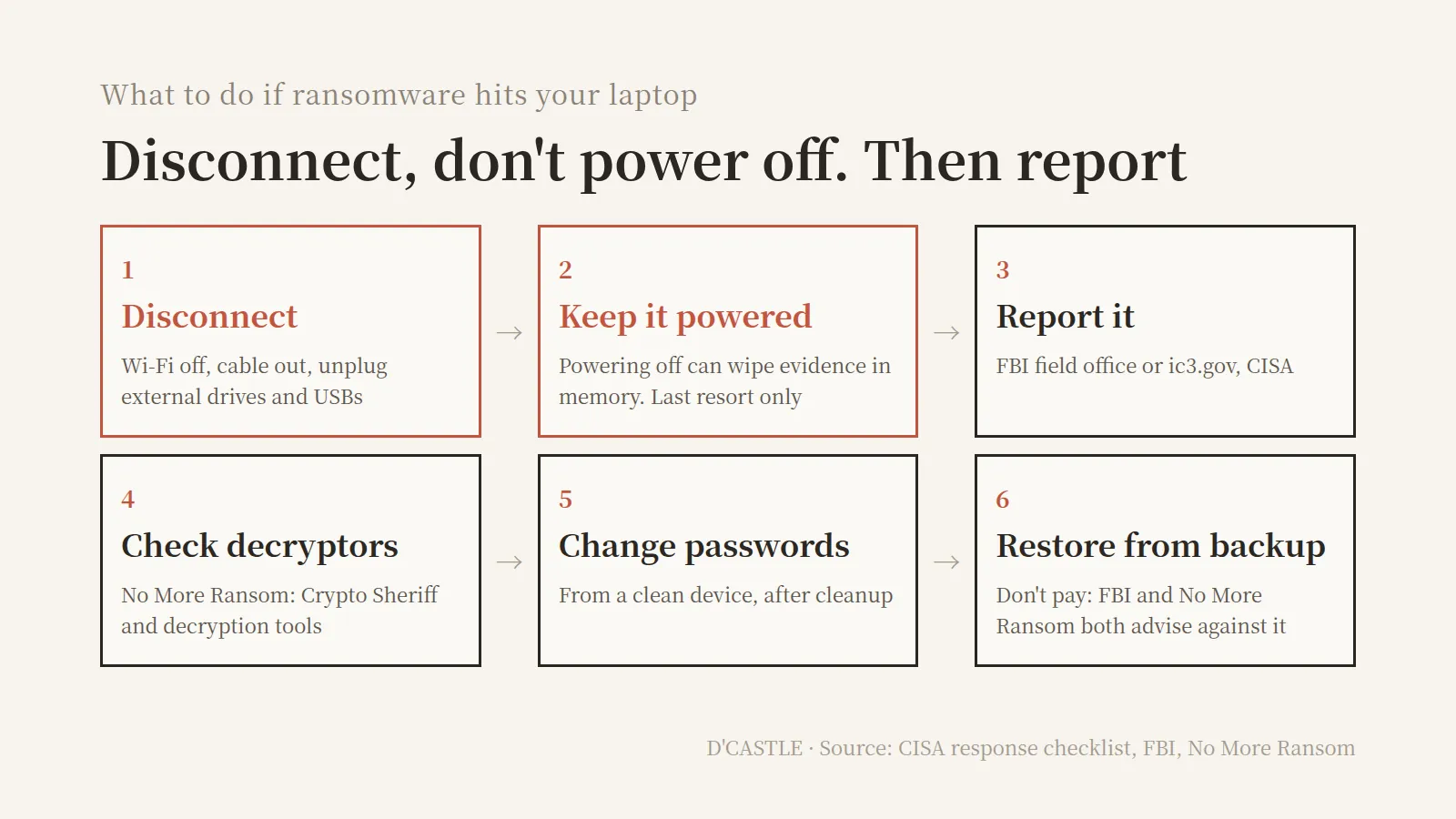
- Disconnect first. Turn off Wi-Fi, pull the network cable, unplug external drives and USB sticks. CISA says to “immediately isolate” affected systems, and the FBI says to keep backups disconnected from the computers they back up.
- Don’t power it off right away. CISA treats powering down as a last resort, only if you can’t disconnect. Shutting down can wipe evidence that lives in memory.
- Report it. In the US, contact your local FBI field office or file at ic3.gov. CISA takes reports too.
- Check for a decryptor. No More Ransom has Crypto Sheriff, which helps identify the ransomware, plus a list of decryption tools. Not every strain has a fix, and new tools get added over time.
- Change passwords from a clean device. CISA notes that mass credential theft is common and says to reset passwords after the environment is fully cleaned and rebuilt.
- Restore from backup, and don’t pay. CISA says to restore from offline backups and be careful not to reinfect the clean system.
Steps 1 and 2 are easy to mix up. You cut the connection, not the power.
Getting things back with Google Drive and GitHub
Google Drive
Google Drive’s help center says uploaded files keep earlier versions. But old versions can be permanently deleted after 30 days or once there are 100 newer ones, unless you mark a version “Keep forever.”
There’s also a ransomware feature now, generally available since March 30, 2026. Drive for desktop watches for ransomware-like changes, pauses syncing, and lets you roll many files back to a healthy point from the Drive website.
File restore works on personal Google accounts, but the automatic detection that pauses syncing is only listed for paid Workspace plans.
Google says the sync pause is there to stop corrupted files from spreading to the cloud. Which means if you sync a laptop folder as-is, locked files can get uploaded too.
On a personal account, then, the key is noticing within the 30 days that old versions stick around.
GitHub
Pushed commits live on GitHub’s servers, not my laptop. If the laptop gets locked, I can clone the repos again on a clean machine.
Two gaps, though:
- Unpushed work: anything committed locally but not pushed, or not committed at all, only exists on the laptop.
- The account itself: if credentials get stolen, the repos are exposed too. GitHub has required two-factor authentication for everyone who contributes code since March 2023.
How not to get hit: lock the doors, then 3-2-1
Three doors to lock
- Updates: keep Windows, your browser, and apps current. It’s the first line of the FBI’s prevention tips.
- Two-step verification: start with Google, GitHub, and email. Microsoft recommends number matching over a plain “Approve” button.
- Remote access: CISA says not to leave Remote Desktop (RDP) open to the internet. Change Healthcare got in through a remote access portal.
Windows “Controlled folder access”
Windows has a built-in ransomware feature, and it’s off by default. It’s right there and it’s off, heh.
According to Microsoft’s docs, it only lets trusted apps change files in protected folders, and it’s included in Windows 11 Home.
Here’s the path Microsoft’s documentation gives:
- Windows Security → Virus & threat protection
- Under Virus & threat protection settings, select Manage settings
- Under Controlled folder access, select Manage Controlled folder access
- Turn the toggle on, then select Yes on the User Account Control prompt
I haven’t checked this on my own screen, so names may differ slightly by Windows version. Look for something close.
By default it protects Documents, Pictures, Videos, Music, and Favorites. You can add more under Protected folders.
One condition: Microsoft Defender has to be your active antivirus with real-time protection on.
If you keep projects in their own folder, adding it seems like the right move. If a trustworthy app gets blocked, you can let it through under “Allow an app through Controlled folder access.”
My backups against the 3-2-1 rule
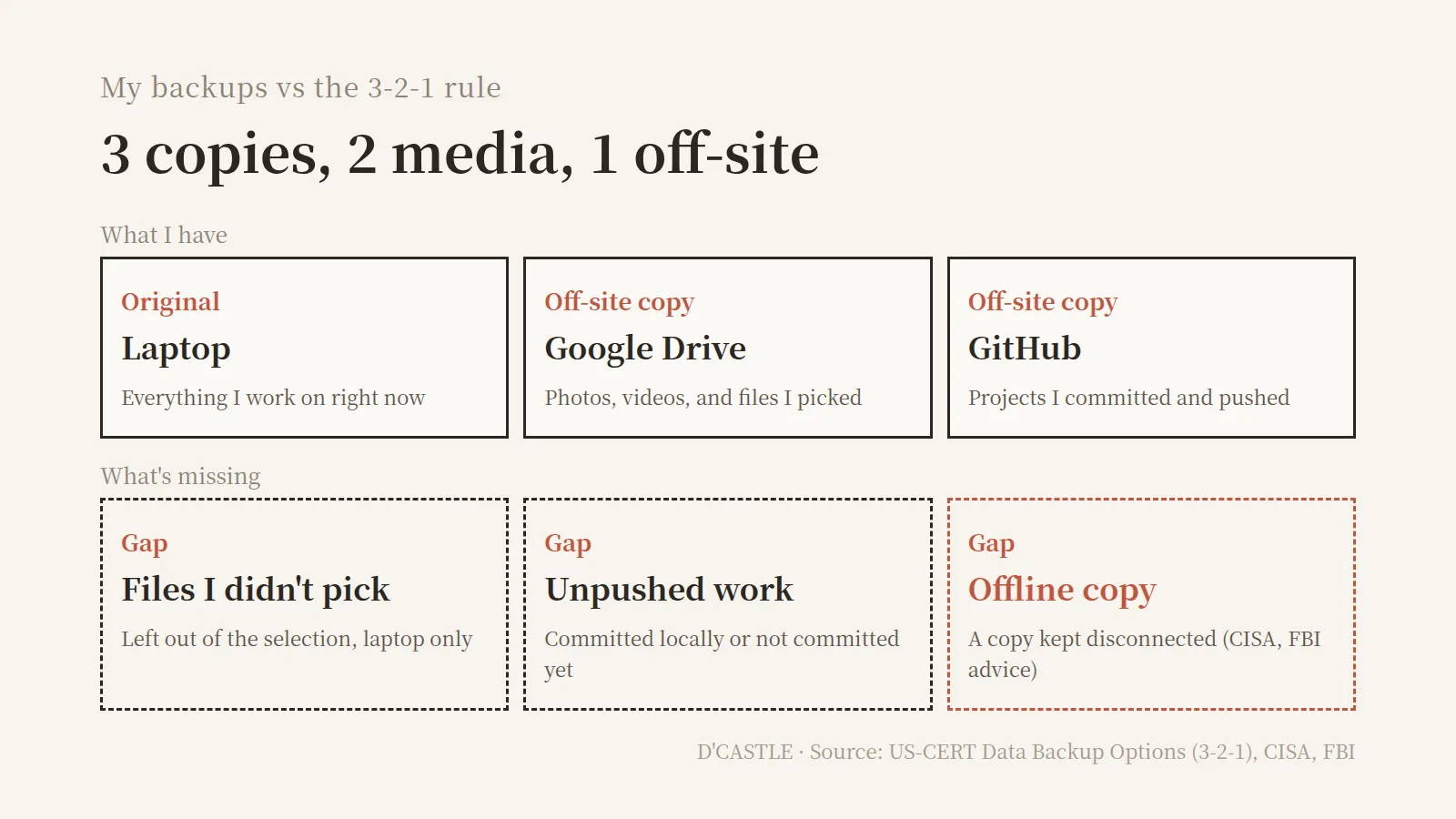
The 3-2-1 rule from US-CERT (now CISA) is three copies (the original plus two backups), on two types of media, with one kept off-site.
Here’s how mine lines up:
- Original: the laptop
- Off-site copies: Google Drive (photos, videos, picked files), GitHub (pushed projects)
- Gaps: files I didn’t pick, unpushed work, and an offline copy that stays disconnected
Uploading to Drive and pushing to GitHub feels like I’m covered but when I hold it up to 3-2-1 the offline slot is empty and the files I didn’t pick have no slot at all.
What CISA and the FBI both push is an offline copy ransomware can’t touch. CISA also says to test restoring from backups regularly.
Turns out the power to not pay comes from copies more than guts.
I’d still refuse out of spite. What lets me actually stick to that is the copies sitting in GitHub and Google Drive.
If you also back up “just the important stuff,” maybe check the Controlled folder access toggle and one folder you never uploaded.
Ransomware doesn’t give you time to pick, so it’s easier to do the picking now.